
Connect Local Communities with ZoomFlock
Overview
ZoomFlock is a desktop application designed to strengthen local communities by connecting residents, associations, and businesses through structured, collaborative networking. Developed by MedOfficePro INC, the software enables users to form groups, engage in threaded discussions, and access verified deals and discounts from local vendors. The platform emphasizes trust and transparency, allowing members to share and reference reviews, recommendations, and solutions within a searchable environment. It serves as a digital hub for community-driven initiatives, helping users discover local opportunities while supporting neighborhood businesses.
Target users include community organizers, neighborhood associations, small business owners, and residents seeking meaningful local connections. The app is particularly useful for groups aiming to coordinate events, share resources, or advocate for local improvements. Real-world applications include organizing community clean-ups, promoting local services, and facilitating peer-to-peer advice on local issues. ZoomFlock’s focus on structured conversations ensures that discussions remain organized and accessible, making it easier for users to find relevant information without sifting through unrelated content.
The developer did not provide additional details about the company’s background beyond its name. Platform compatibility information is limited to Windows and Mac, with a download size of 45.6 MB. The software is available at no cost, reflecting its community-first approach.
Key Features & Capabilities
- Threaded and Tagged Discussions – Users can initiate and participate in organized conversations with threaded replies, making it easy to follow complex discussions. Tags help categorize topics, improving discoverability and relevance.
- Searchable Review Library – All user reviews and recommendations are stored in a searchable database, allowing members to quickly reference past experiences and decisions.
- Verified Vendor Network – Local businesses listed on the platform are qualified by the community, ensuring that deals and discounts come from trusted sources.
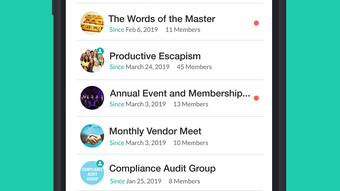
- Group Creation and Management – Users can create and manage private or public groups for specific interests, events, or neighborhood needs.
- Deal and Discount Aggregation – The app consolidates offers from local vendors, enabling users to compare and claim exclusive savings.
These features support real-time collaboration and long-term knowledge retention. For example, a neighborhood association can create a group to discuss local safety concerns, tag each thread by topic (e.g., “lighting,” “traffic”), and refer to past discussions when planning improvements. Similarly, users can search for “best local bakery” and instantly access verified reviews and recommendations from trusted peers.
User Interface, Workflow & Performance
The user interface is designed for clarity and ease of navigation, with a clean layout that prioritizes content visibility. Core functions such as group access, discussion posting, and review searching are accessible through intuitive menus and toolbars. Navigation is consistent across both Windows and Mac platforms, minimizing the learning curve for new users.
Workflow efficiency is enhanced by the app’s structured approach to communication. Users can quickly jump between threads, apply filters, and tag posts for better organization. The developer did not specify resource usage details, so performance behavior remains general. However, the 45.6 MB file size suggests a lightweight application, likely resulting in low memory and CPU demands during operation.
Stability observations are based on general software behavior patterns. The software does not include built-in performance monitoring tools, and no user reports or benchmarks were provided. The app appears to be optimized for regular use without requiring high-end hardware.
Compatibility & System Requirements
ZoomFlock is available for both Windows and Mac operating systems. The software version is 1.0.2, with a total installation size of 45.6 MB. The developer did not specify exact system requirements, including minimum RAM, processor speed, or disk space beyond the file size.
Platform compatibility information is limited to the two major desktop operating systems. No details were provided about support for older OS versions or accessibility features. The developer did not list any hardware dependencies or peripheral requirements.
Pros and Cons
Pros
- Free to use with no hidden costs
- Structured, searchable discussions improve information retention
- Supports community-driven deal negotiations with local vendors
- Lightweight installation size (45.6 MB)
- Available on both Windows and Mac platforms
Cons
- Exact system requirements were not listed
- Performance behavior not verified through benchmarks
- No information on update frequency or release cycle
- Developer background not publicly detailed
- Offline functionality details were not provided
FAQ Section
Is ZoomFlock available for both Windows and Mac?
Yes, ZoomFlock is compatible with both Windows and Mac operating systems.
Is the software free to download and use?
Yes, ZoomFlock is offered at no cost to users. There are no subscription fees or in-app purchases mentioned.
Can I use ZoomFlock offline?
Information about offline functionality was not provided by the developer.
How often is ZoomFlock updated?
The update schedule or release cycle was not specified in the available documentation.
Is my data secure when using ZoomFlock?
Security practices were not detailed in the provided information. Users are advised to review the privacy policy if available.
Final Thoughts + CTA
ZoomFlock presents a thoughtful solution for communities seeking to strengthen local ties through structured, trustworthy interactions. Its focus on threaded discussions, searchable reviews, and verified vendor deals sets it apart from generic social platforms. While system requirements and performance metrics are not fully disclosed, the lightweight footprint and cross-platform availability make it accessible to a broad audience.
Community leaders, neighborhood groups, and small business advocates will find the most value in this tool. It fosters collaboration, supports local economies, and creates a lasting digital record of community decisions and recommendations.
Download ZoomFlock now to build stronger, more connected neighborhoods today.







